A Skype Alternative for Screen Sharing
Skype shut down in May 2025 after Microsoft moved everyone to Teams. If you only ever used it to show someone your screen, Teams is a heavier replacement than you need. Sharry does that one thing — screen sharing, in a browser, no account required.
Why Sharry instead
- No Microsoft account or Teams install needed.
- No download for either side — works the moment you open a link.
- Peer-to-peer, end-to-end encrypted via WebRTC.
- Built for the exact thing Skype's screen share did, without pulling in chat, calling, and calendar features you didn't ask for.
How to share your screen with Sharry
- 01
Start a session
Open sharry.live and create a session. No sign-up required on the free plan.
- 02
Copy the invite link
Send the invite link to whoever is watching — no contact request to accept first.
- 03
They join from the link
They open the link in any browser, on any device — nothing to install on their end either.
- 04
Share your screen
Click Share Screen, pick a tab, window, or your full display. They see it in real time.
Good to know
- If you relied on Skype for calling or messaging too, Teams (or another full communication app) covers more ground than Sharry — Sharry is screen sharing only.
- The free plan covers 5-minute sessions with 1 viewer. Pro removes those limits — free during Early Access.
- Only the host sends video; viewers watch in real time.
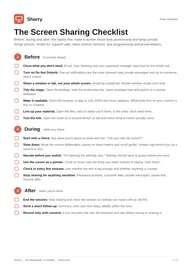
Get the free Screen Sharing Checklist
Before, during and after a screen share, plus a tip for every use case. 2-page PDF, plus occasional updates. Unsubscribe anytime.
By subscribing you agree to receive the checklist and occasional product update emails. We send a confirmation email first.