A TeamViewer Alternative for Remote Screen Viewing
Auf Deutsch lesenTeamViewer is a full remote-control suite: an installer on both ends, a login, and licensing if you use it commercially. If you just need to see someone's screen to help them, that's a lot of tool for a small job. Sharry is a browser tab away for both sides.
Why Sharry instead
- No installer for host or viewer — TeamViewer requires a download on both ends, even for a one-off session.
- No license or account needed for casual, personal support sessions.
- Peer-to-peer, end-to-end encrypted via WebRTC.
- Built for viewing, not remote control — simpler and lower-risk when you only need to see the screen, not operate it.
How to view a screen with Sharry
- 01
Ask them to open sharry.live
They create a session on their machine and copy the invite link.
- 02
You join as the viewer
Open the invite link on your side — or join at sharry.live/join with the Session ID and password they share.
- 03
They share their screen
They click Share Screen and pick the window or display you need to see.
- 04
End when you're done
Stop sharing or close the session. Nothing is stored as a recording on Sharry's servers.
Good to know
- Sharry doesn't offer remote control (mouse/keyboard) — if you need to take over their machine, TeamViewer or a similar tool still makes sense.
- The free plan covers 5-minute sessions with 1 viewer. Pro removes those limits — free during Early Access.
- Good fit for the common case — "let me see what's happening on your screen" — rather than full remote administration.
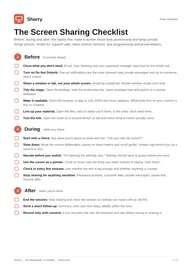
Get the free Screen Sharing Checklist
Before, during and after a screen share, plus a tip for every use case. 2-page PDF, plus occasional updates. Unsubscribe anytime.
By subscribing you agree to receive the checklist and occasional product update emails. We send a confirmation email first.